Matplotlib Plotting
This framework provides tools for visualizing DT chamber data at the drift cell level using Matplotlib,
with full support for custom plotting functions and flexible configuration. The plotting tools (plot-dt and plot-dts)
leverage a modular artist system and the mpldts package to create high-quality visualizations of detector data.
The plotting system is highly configurable: you define which plotting artists (functions that draw specific features) to use, how to color the cells, and which event or chamber to visualize—all through your YAML configuration file. This enables you to easily switch between different visualization styles or add new features without changing the core plotting code.
Configuration Example
In your run_config.yaml, you specify the plotting configuration under the plot_configs key. Here is a typical example:
plot_configs:
  mplhep-style: 'CMS'         # Style to use for the plots

  figure-configs:
    figure.dpi: 100             # Dots per inch (resolution)
    axes.titlesize: 'small'     # Axes title size
    axes.labelsize: 'x-small'   # Axes label size
    xtick.labelsize: 'x-small'  # X-axis tick label size
    ytick.labelsize: 'x-small'  # Y-axis tick label size
    legend.fontsize: 'small'    # Legend font size

  artists:
    dt-station-global: &dt-station-global
      src: "dtpr.utils.dt_plot_functions.embed_dts2axes"
      rep-info:
        particle_type: 'digis'
        cmap_var: 'time'
      bounds_kwargs:
        facecolor: ["lightgray", "lightyellow", "lightpink", "lightblue"]
        edgecolor: "k"
        alpha: 0.3
        linewidth: 0.5
      cells_kwargs:
        edgecolor: "k"
        linewidth: 0.025
        cmap: 'viridis'
        norm:
          class: 'Normalize'
          vmin: 299
          vmax: 1000

    dt-station-local:
      <<: *dt-station-global
      src: "dtpr.utils.dt_plot_functions.embed_dt2axes"

    dt-am-tps-global:
      src: "dtpr.utils.dt_plot_functions.embed_segs2axes_glob"
      rep-info:
        particle_type: 'tps'
        cmap_var: 'quality'
      segs_kwargs:
        linewidth: 0.8
        cmap:
          name: 'viridis'
          N: 9
        norm:
          class: 'BoundaryNorm'
          boundaries: [0.1, 1, 2, 3, 4, 5, 6, 7, 8, 9]
          ncolors: 9
          clip: True
# ...
Note
Each artist is a Python function (see dtpr/utils/dt_plot_functions.py) that receives the event
and plotting axes, and draws a specific feature (e.g., digis, segments, showers, or detector outlines).
You can add your own artists by defining new functions and referencing them in the configuration.
How It Works
DTPatternRecognition combines your configuration, the event data, and Matplotlib to create these visualizations.
The plotting process involves the dtpr CLI dispatching to the plot_dt_chamber function, which then
consults RUN_CONFIG for plotting instructions and uses artist-builder functions to draw on Matplotlib axes.
        sequenceDiagram
    participant User
    participant dtpr CLI
    participant RUN_CONFIG
    participant plot_dt_chamber
    participant Event
    participant Artist Builder
    participant Matplotlib

    User->>dtpr CLI: dtpr plot-dt ...
    dtpr CLI->>RUN_CONFIG: Load/Update config (plot_configs, artists)
    dtpr CLI->>plot_dt_chamber: Call plot_dt_chamber(inpath, ...)
    plot_dt_chamber->>Event: Load specific Event (e.g., event 11)
    Event-->>plot_dt_chamber: Returns Event object

    plot_dt_chamber->>RUN_CONFIG: Request plot_configs, artist builders
    RUN_CONFIG-->>plot_dt_chamber: Returns style, fig configs, artist_builders dict

    plot_dt_chamber->>Matplotlib: Set overall style (mplhep) and figure configs
    plot_dt_chamber->>Matplotlib: Create Figure and Axes (phi, eta views)

    loop For each selected Artist (e.g., "dt-station-local")
        plot_dt_chamber->>Artist Builder: Call embed_dt2axes(ev, wh, sc, st, ax_phi, ax_eta, ...)
        Note over Artist Builder: Filters event for particles. Uses mpldts.patches.DTStationPatch
        Artist Builder-->>Matplotlib: Adds patches/plots to axes
    end

    plot_dt_chamber->>Matplotlib: Adjust layouts, add colorbar
    plot_dt_chamber->>Matplotlib: Show or Save plot
    Matplotlib-->>plot_dt_chamber: Plot rendered
    plot_dt_chamber-->>dtpr CLI: Done
    dtpr CLI-->>User: Output messages / Image file
Explanation of the Flow:
1. CLI Invokes ``plot_dt_chamber``: You run the dtpr plot-dt command. The CLI (after configuring RUN_CONFIG)
calls the plot_dt_chamber function from dtpr/analysis/plot_dt_chamber.py.
Load Event: The
plot_dt_chamberfunction loads the specificEventobject you requested (e.g., event 11) using the [NTuple Data Access](ntuple_data_access.html). ThisEventwill have all itsParticleobjects and preprocessed data ready.Parse Plot Configuration: It then calls
parse_plot_configs()(fromdtpr/utils/functions.py) which consultsRUN_CONFIGto get themplhep-style,figure-configs, and a dictionary of all availableartist_builders(Python functions linked to artist names).A note on ``artist_builders``:
parse_plot_configsdoesn’t just return the function paths; it dynamically imports the functions and usesfunctools.partialto pre-fill them with therep-infoand stylingkwargsdefined inrun_config.yaml. This means theartist_builderfunctions receive all their specific configuration upfront.
Setup Matplotlib:
plot_dt_chamberuses the retrievedmplhep-styleandfigure-configsto set up Matplotlib’s global plotting style. It then creates amatplotlib.figure.Figure(the canvas) andmatplotlib.axes._axes.Axes(the individual plots, one for phi view, one for eta view).Build and Embed Artists: For each
artist-nameyou specified in the CLI (e.g.,dt-station-local),plot_dt_chamberretrieves the correspondingartist_builderfunction from its dictionary. It calls thisartist_builderfunction, passing it theEventobject, the chamber location (wheel,sector,station), and the MatplotlibAxesobjects.The
artist_builderfunction (e.g.,embed_dt2axesindtpr/utils/dt_plot_functions.py) then performs the actual drawing. It filters theEvent’s particles (e.g.,digis) for the specific chamber, and uses specializedmpldtsclasses likeDTStationPatchto create visual elements (patches) that represent the detector geometry and data. These patches are then added to the MatplotlibAxes.
Final Touches and Output: After all artists are added,
plot_dt_chamberadjusts the plot layout, adds a color bar (if needed), and then either displays the plot window (plt.show()) or saves it to a file (save_mpl_canvas()) as specified by the--saveargument.
Usage
To visualize a single DT chamber, run:
dtpr plot-dt -i [INPATH] -o [OUTPATH] -cf [CONFIG_FILE] -evn 0 --wheel 2 --sector 1 --station 1 --artist-names [ARTIST_NAMES ...]
This will produce a plot for the specified chamber and event, using the artists and style defined in
your configuration (use --artist-names all to include all available artists).
To visualize all chambers in an event, run:
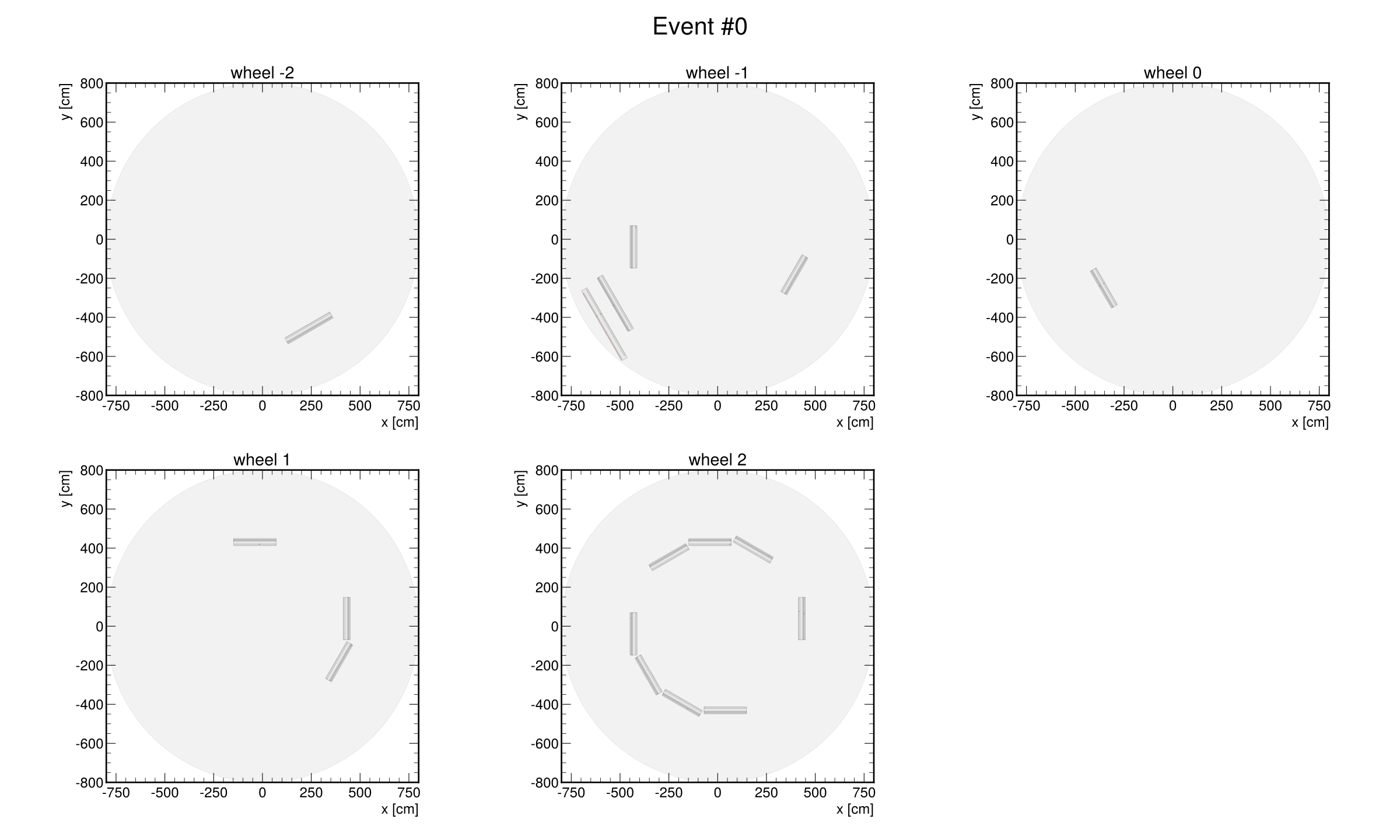
dtpr plot-dts -i [INPATH] -o [OUTPATH] -cf [CONFIG_FILE] -evn 0 --artist-names [ARTIST_NAMES ...]
This will generate a multi-panel plot showing all wheels for the selected event (if --artist-names ìs not specified at least the DT chambers are plotted).
Customization and Advanced Features
Custom Artists: You can define your own plotting functions in Python and add them to the
artistssection of your configuration. Each artist receives the event and axes, and can use any Matplotlib or mpldts features.Flexible Colormaps: The
cmap_varandnormoptions allow you to color cells by any numerical variable (e.g., time, BX, quality) and control the color scaling.Multiple Overlays: You can combine multiple artists (e.g., digis, segments, showers, detector outlines) in a single plot by listing them in the configuration.
Styles: The
mplhep-styleandfigure-configsoptions let you match the look and feel of HEP styles.
General Format for Custom Artists
Each artist entry in your configuration should follow this general structure:
artists:
  artist-name:
    src: "path.to.your_function"
    rep-info:
      particle_type: "your_particle_type"
      cmap_var: "your_variable_for_colormap"   # Optional
    # kwargs_for_your_function
    key1: value1
    key2: value2
    # ... more kwargs as needed
Where:
artist-name: A unique name for your artist (used to reference it in plotting).src: The Python import path to your plotting function.rep-info: A dictionary of arguments that will be passed to your function (e.g., which particle type to plot, which variable to use for coloring).Additional keys (e.g.,
cells_kwargs,bounds_kwargs, etc.) are passed as keyword arguments to your function for further customization.
Your Python artist function should have the following signature:
def my_artist_function(ev, wheel, sector, station, ax_phi=None, ax_eta=None, particle_type='digis', **kwargs):
    # ... implementation ...
    return patch_phi, patch_eta
It must return a tuple of Matplotlib objects (patches, lines, etc.) for the phi and eta views, or
(None, None)if not applicable.All returned objects should support the
.remove()method for proper plot management.
Example: Adding a Custom Artist
Suppose you want to overlay a scatter plot of simHits on top of your digis. First, define a function, for instance, in dtpr/utils/dt_plot_functions.py:
    wheel: int,
    sector: int,
    station: int,
    ax_phi: Optional[Axes] = None,
    ax_eta: Optional[Axes] = None,
    particle_type: str = "simhits",
    **kwargs,
) -> Tuple[Optional[List[PathCollection]], Optional[List[PathCollection]]]:
    """
    Embed simHits data into local phi and/or eta axes as scatter points.

    :param ev: Event containing simhit data
    :type ev: Event
    :param wheel: Wheel identifier
    :type wheel: int
    :param sector: Sector identifier
    :type sector: int
    :param station: Station identifier
    :type station: int
    :param ax_phi: Matplotlib axes for phi view
    :type ax_phi: Optional[Axes]
    :param ax_eta: Matplotlib axes for eta view
    :type ax_eta: Optional[Axes]
    :param particle_type: Type of particles to plot
    :type particle_type: str
    :param kwargs: Additional arguments for scatter plots
    :return: Tuple of (phi_patches, eta_patches)
    :rtype: Tuple[Optional[List[PathCollection]], Optional[List[PathCollection]]]
    """
    _validate_axes(ax_phi)
    _validate_axes(ax_eta)

    if ax_phi is None and ax_eta is None:
        raise ValueError("At least one of 'ax_phi' or 'ax_eta' must be provided.")

    particles = ev.filter_particles(particle_type, wh=wheel, sc=sector, st=station)
    if not particles:
        return None, None

    style_map = {
        13: {"color": "red", "s": 35, "marker": "*"},
        11: {"color": "yellow", "s": 10, "marker": "o"},
        22: {"color": "blue", "s": 20, "marker": "s"},
    }

    _parent_station = stations_cache.get(wheel, sector, station)

    patch_phi, patch_eta = None, None

    for part in particles:
        if not hasattr(part, "sl") or not hasattr(part, "l") or not hasattr(part, "w"):
            raise ValueError(
                f"Particle {part} does not have required attributes 'sl', 'l', and 'w' for {particle_type}"
            )
        sl, l, w, particle_type = part.sl, part.l, part.w, abs(part.particle_type)
        center = _parent_station.super_layer(sl).layer(l).cell(w).local_center
        if sl == 2:
            if patch_eta is None:
                patch_eta = []
            patch_eta.append(
                ax_eta.scatter(center[0], center[2], **style_map[particle_type], **kwargs)
            )
        else:
            if patch_phi is None:
                patch_phi = []
            patch_phi.append(
Then, add it to your configuration:
  dt-segment-local:
    <<: *dt-segment-global

  dt-am-tps-global: &dt-am-tps-global
Now, include dt-simhits-local in your list of artists to use for plotting.
Tip
Notes
You can use any
particle(e.g.,digis,simhits,tps, etc.) that can be represented in a DT cell, as long as the required attributes (sl,l,w) are present.All artist functions must return Matplotlib objects (patches, lines, etc.) that support the
.remove()method for proper plot management. (This is mainly used by the event visualizer GUI tool.)The configuration-driven approach makes it easy to adapt your plots to new data types or visualization needs without changing the plotting code.